


Theory versus practice: why design systems alone fall short
A design system, at its core, is theory. It articulates principles, defines standards, and documents patterns. This theory is valuable: it creates shared understanding and prevents arbitrary decisions.
But theory doesn't ship features. Your engineers don't import documentation into their codebase. Your designers don't hand off PDFs of principles.
The Nielsen Norman Group notes that design systems enable rapid replication through reusable components [1]. The key word is components… implemented code that embodies design system theory in executable form. That's your UI Kit.
Think of it this way: the design system is the architectural blueprint; the UI Kit is the prefabricated components that construction teams actually install. Without those components, every team builds from raw materials, interpreting the blueprint independently.
The execution gap: where development time disappears
Consider what happens without a UI Kit. Your design system specifies that cards should have a particular shadow, border radius, and padding. Three product teams need cards. Each team:
- Reads the design system documentation
- Interprets the specifications in their technology stack
- Implements a card component
- Tests and refines until it matches their understanding of the spec
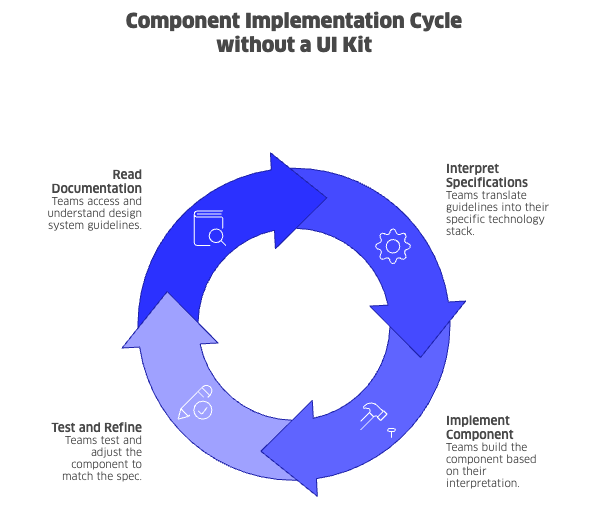
Multiply this by every component. Multiply again by every team. You've invested in standards that multiply implementation work rather than reducing it.
Forrester observes that design systems help teams avoid solving the same problems repeatedly [2]. But this only works when solved problems exist as reusable code - not just documented solutions.
The AI acceleration - and its hidden cost
AI-powered development tools have fundamentally changed how quickly teams can generate interfaces. Your designers use AI to rapidly prototype screens. Your engineers use coding assistants to scaffold components in minutes. Product managers can demo concepts that once took weeks to visualise.
This acceleration is real and valuable. But it introduces a consistency challenge that many leadership teams haven't yet addressed.
AI tools generate code. They don't inherently follow your design system.
When a designer uses an AI tool to generate a prototype, that prototype reflects the AI's training data and the prompt - not your organisation's established patterns. When an engineer uses a coding assistant to build a form, the output may be functional but stylistically disconnected from your existing product surfaces.
The result: your teams ship faster, but the product fragments. Each AI-assisted sprint adds components that look slightly different, behave slightly differently, and carry slightly different accessibility implementations. The speed gain creates a consistency debt that compounds over time.
If you're seeing UI inconsistencies creep in faster than before, AI-assisted workflows without proper foundations may be part of the reason.
Why the UI Kit matters more in an AI-enabled workflow
Here's the good news: AI tools don't make the UI Kit obsolete. They make it more essential.
A well-structured UI Kit serves as the source of truth that both your human teams and AI tools can reference. When AI generates code, that code should compose existing UI Kit components rather than inventing new ones. When designers prototype rapidly, those prototypes should map to components that already exist in production.
This requires intentional integration:
- AI-aware component libraries. UI Kit designed with clear APIs and comprehensive documentation are easier for AI tools to use correctly. The more explicit your component contracts, the more reliably AI can generate consistent output.
- Prototype-to-production pipelines. You need workflows that translate AI-generated prototypes into UI Kit-based implementations - not workflows that treat prototypes as production code.
- Guardrails, not gatekeeping. The goal isn't to slow AI-assisted work but to channel it. A UI Kit provides the constraints that keep rapid iteration aligned with your product standards.
Google's Material Design exemplifies this approach. Extensive documentation explains the thinking behind decisions. Component libraries provide the implementation teams actually use [4]. AI tools trained on well-documented systems produce more consistent output - but only when the underlying components exist to reference.
Human-AI collaboration: speed and consistency together
The organisations gaining the most from AI-assisted development aren't choosing between speed and consistency. They're structuring workflows that deliver both.
- Designers and AI collaborate on exploration. AI tools accelerate ideation and early prototyping. Your designers guide this process, ensuring concepts align with brand and user experience principles - even when moving fast.
- Engineers and AI collaborate on implementation. Coding assistants help your engineers work more efficiently, and that efficiency multiplies when the AI generates code that uses established UI Kit components rather than custom implementations.
- The UI Kit is the shared language. Whether a component originates from a designer's prototype, an engineer's implementation, or an AI's suggestion, it should resolve to the same underlying UI Kit building blocks. This is how consistency scales alongside velocity.
The risk of excluding either human expertise or AI capability is real. Pure AI-generated output lacks the contextual judgment that experienced designers and engineers provide. Pure manual implementation foregoes speed advantages that your competitors will capture. The UI Kit enables a middle path - human direction with AI acceleration, grounded in shared components.
How a UI Kit accelerates product delivery
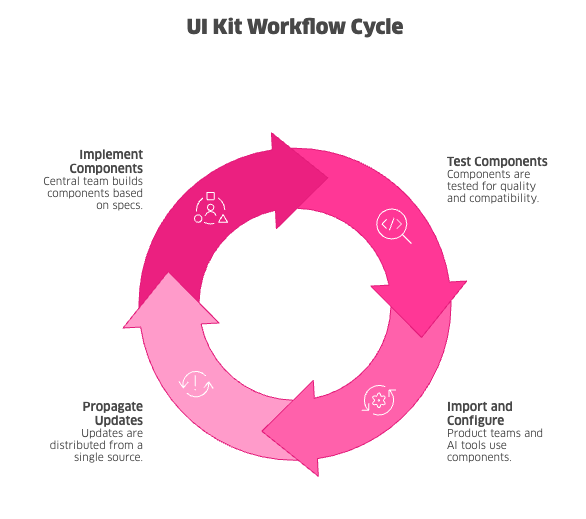
When a UI Kit exists, the workflow changes fundamentally:
- A central team implements components to design system specifications
- Components are tested for accessibility, responsiveness, and cross-browser compatibility
- Product teams - and AI tools - import components and configure them for their context
- Updates propagate from a single source, reducing technical debt
Your design system remains important - it guides UI Kit development and provides context for decisions. But the UI Kit is what your teams interact with daily. It's the operational core that determines whether standards translate into consistent, scalable products.
In AI-enabled workflows, this operational core does double duty: it accelerates your human teams and constrains AI output toward consistency.
Why UI Kit investment often lags behind
If UI Kit are so essential, why do organisations underinvest in them? You've likely encountered some of these dynamics:
- Visibility bias. Design systems produce visible artefacts - style guides, Figma libraries, brand documentation - that stakeholders can review and approve. UI Kit produce code that's harder to demonstrate in executive presentations. The work that's easier to show often gets more attention.
- Ownership ambiguity. Design systems often live within design organisations. UI Kit require significant frontend engineering investment. The handoff between these functions creates accountability gaps that nobody explicitly owns.
- Underestimated effort. Building robust, flexible, well-documented components takes substantial engineering time. It's common to allocate less than needed, treating the UI Kit as an afterthought rather than core infrastructure.
- AI-driven shortcuts. Teams using AI tools to generate UI quickly may deprioritise UI Kit investment, not realising that each AI-generated component adds to long-term maintenance burden.
- Premature tooling decisions. Teams sometimes begin UI Kit development before design system foundations are stable, leading to costly rework when visual standards or interaction patterns change.
Shopify's experience rebuilding Polaris foundations illustrates the cost of these gaps. Insufficient component and design token coverage made broad changes expensive and slow [3]. Addressing these gaps became essential to restore development velocity.
What makes a UI Kit effective
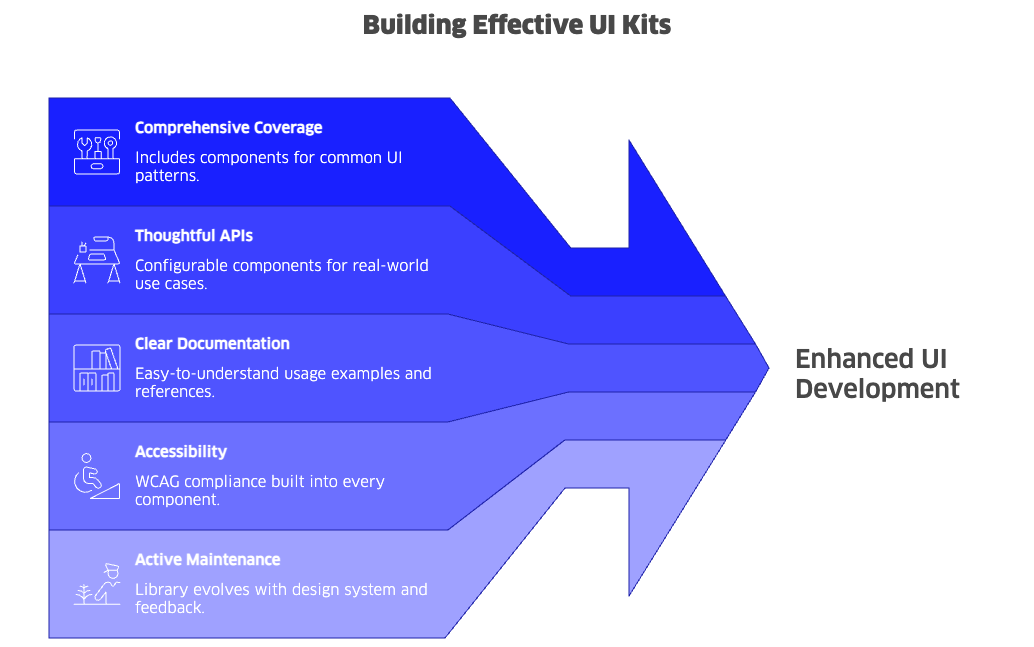
Not all component libraries deliver equal value. If you're evaluating your current UI Kit - or planning to build one - these characteristics drive adoption:
- Comprehensive coverage. The library includes components for common UI patterns. Your teams should rarely need to build from scratch, freeing engineers to focus on product-specific logic. Comprehensive coverage also means AI tools have more building blocks to work with correctly.
- Thoughtful APIs. Components are configurable enough to handle real use cases without being so flexible that they enable inconsistency. Getting this balance right determines whether teams actually adopt the UI Kit.
- Clear documentation. Engineers can find usage examples, API references, and integration guidance quickly. For AI tools, well-structured documentation improves the quality of generated code that references your UI Kit.
- Accessibility by default. WCAG compliance is built into every component, not left to each product team to implement separately. This reduces risk and ensures consistent user experiences - especially important when AI-generated code might otherwise omit accessibility considerations.
- Active maintenance. The library evolves alongside your design system and responds to product team feedback. A stagnant UI Kit becomes an obstacle rather than an enabler.
Atlassian describes its design system as enabling teams to build with confidence using dependable, reusable components [5]. That dependability requires ongoing investment - not a one-time build followed by neglect.
Measuring design system ROI through UI Kit adoption
Design system success is often measured by documentation completeness or design file organisation. These metrics track theory, not practice.
If you want to understand actual operational impact, focus on UI Kit-specific metrics:
- Component adoption rate. What percentage of your product UI uses shared components versus custom implementations? Higher adoption correlates with faster delivery and lower maintenance costs.
- Custom component creation. How often do teams build components that could be shared? Frequent custom work - whether human-authored or AI-generated - signals UI Kit gaps or adoption barriers.
- Time to implementation. How long from design handoff to working code? A mature UI Kit dramatically reduces this cycle, with or without AI assistance.
- Consistency defects. How many QA issues relate to UI inconsistency? Shared components reduce variation that causes these defects. This metric often reveals when AI-generated code has bypassed established patterns.
- AI output alignment. When AI tools generate UI code, how often does that code use UI Kit components versus custom implementations? This emerging metric helps you understand whether your AI workflows reinforce or undermine consistency.
Shopify reports that Polaris components cover roughly 70 percent of Admin UI, while design tokens reach about 44 percent [3]. Lower coverage correlates with higher costs when making broad visual or interaction changes. The metric that matters isn't whether a design system exists - it's how much of the product it actually powers.
The UI Kit team as frontend infrastructure
Organisations that succeed treat the UI Kit as internal platform infrastructure. A dedicated team owns component development, reviews contributions from product teams, and maintains quality standards.
This team operates differently from your product teams:
- Internal customers. Success means product teams ship faster and more consistently. The UI Kit team's output is measured by the velocity and quality it enables across your organisation.
- Pattern-driven requirements. Components address recurring needs identified across multiple products, not one-off feature requests. This ensures broad applicability and adoption.
- AI workflow integration. The team considers how AI tools interact with the component library, ensuring documentation and APIs support AI-assisted development patterns.
- Elevated quality standards. Components used across products can't have rough edges. Accessibility, performance, and cross-browser compatibility must meet high bars.
- Continuous feedback loops. The team learns from how components are used in practice - by humans and AI - iterating based on real adoption data rather than theoretical requirements.
Both Shopify and Atlassian emphasise contribution models and component lifecycle management [3][5]. The UI Kit team enables product teams rather than creating bottlenecks. This balance lets you scale product development without proportionally scaling coordination overhead.
Evolution: why static UI Kit become constraints
A static UI Kit eventually becomes a constraint on product innovation. Product needs evolve. Design trends shift. Technology stacks change. User expectations rise. AI capabilities expand.
Effective UI Kit evolve continuously:
- New components emerge from recurring product patterns that signal shared needs across teams.
- Existing components adapt to new requirements discovered through real-world usage.
- AI integration improves as your teams learn which documentation patterns and API designs produce the most consistent AI-generated output.
- Deprecated components phase out gracefully, with clear migration paths that respect product team timelines.
- Breaking changes are managed thoughtfully, balancing system improvement against adoption disruption.
Material Design documentation emphasises foundations that support ongoing change [4]. The UI Kit is infrastructure, and infrastructure requires sustained maintenance investment. If you treat the initial build as the finish line, you'll find your system increasingly misaligned with product reality - and increasingly bypassed by teams using AI to move faster.
From documentation to delivery: the strategic question
Design systems for development speed and product consistency deliver on their promise only when theory becomes practice. The UI Kit is where that transformation happens.
In an era of AI-accelerated development, the UI Kit's role expands. It's no longer just the shared foundation for your human teams - it's the constraint layer that keeps AI-generated output aligned with your product standards. If you invest in a robust, well-documented UI Kit, you'll capture AI's speed advantages while maintaining consistency. If you don't, you'll find fragmentation and technical debt accumulating faster than ever.
As you evaluate your design system investments, the question isn't whether standards exist - it's whether those standards execute. Ask yourself:
- Do your product teams reference design documentation but still build custom UI implementations?
- Does consistency depend on code review vigilance rather than shared components?
- Do design handoffs still require extensive interpretation and back-and-forth?
- Is UI-related technical debt accumulating faster than it's being addressed?
- Are AI-assisted prototypes and code creating new sources of inconsistency?
If the answer to any of these is yes, the UI Kit is likely where focused investment will yield the highest returns.
A design system without a UI Kit is intent without mechanism. The UI Kit is what makes the system work - transforming documented standards into engineering productivity, faster time to market, and the product consistency your users experience. With AI tools reshaping how teams build, the UI Kit becomes the essential bridge between human creativity, machine speed, and coherent product delivery.
What are you waiting for?
Mosano helps companies design, build, and scale digital products with component libraries and design systems that accelerate delivery instead of slowing it down. Whether your teams work with AI tools, traditional workflows, or both - we help you close the gap between design system documentation and engineering execution. Get in touch with our team to explore what's possible.
References
[1] Nielsen Norman Group, Design Systems 101, 2021
[2] Forrester, You Need a Design System. Here's Why, 2022
[3] Shopify, Putting the system back in our design system, 2024
[4] Google, Material Design documentation and design tokens
[5] Atlassian, About Atlassian Design System